

技术专栏丨iOS中Log同步获取与重定向
在iOS开发的过程中,经常会使用 NSLog 作为调试和查看相关数据的输出口,该方法连接Xcode构建项目时能够实时输出开发者在代码线中打印的日志。但是在断开Xcode并使用真机测试的时候,经常会无法查看真机的实时日志,导致一些问题难以追查和确定,使得问题的定位与解决花费较长的时间,一定程度上影响了产品开发的进度和优化。
面对诸如此类的问题,我们可以通过Log信息的重定向等技术,让相关的Log信息转存到一个我们能够提取的地方,方便开发人员在出现问题的时候,得到详细的Log信息,快速的识别出问题的原因并修复和优化等。
//
NSLog的输出到底在哪里?
//
在iOS的系统API中,专门提供了一个上层函数 NSLog 以供开发者调用并打印相关的信息, NSLog 本质上是一个C函数,它的声明如下:
FOUNDATION_EXPORT void NSLog(NSString *format, ...)
系统对该函数的说明是: Logs an error message to the Apple System Log facility 。简单的说就是用来输出信息到标准的
Error控制台上,其内部其实是使用 Apple System Log(asl) 的API,至少iOS 10以前是这样。在调试阶段,日志会输出到Xcode
中,而在真机上,会输出到系统的 /var/log/syslog 文件中。
//
Apple System Logger
//
我们可以通过官方文档了解到,OC中最常见的NSLog操作会同时将标准的Error输出到控制台和系统日志(syslog)中(C语言的printf 系列函数并不会,swift的printf为了保证性能也只会在模拟器环境中输出)。其内部是使用Apple System Logger(简称ASL)去实现的,ASL是苹果自己实现的用于输出日志到系统日志库的一套API接口,有点类似于SQL操作。在iOS真机设备上,使用ASL记录的log被缓存在沙盒文件中,直到设备被重启。
既然日志被写入系统的syslog中,那我们可以直接读取这些日志。从ASL读取日志的核心代码如下:
注:滑动查看完整代码(下同)
1#import <asl.h>
2// 从日志的对象aslmsg中获取我们需要的数据
3+( instancetype)logMessageFromASLMessage:(aslmsg)aslMessage{ SystemLogMessage *logMessage = [[SystemLogMessage alloc] init]; constchar*timestamp = asl_get(aslMessage, ASL_KEY_TIME);
4if(timestamp) {
5NSTimeIntervaltimeInterval = [@(timestamp) integerValue];
6constchar*nanoseconds = asl_get(aslMessage, ASL_KEY_TIME_NSEC);
7if(nanoseconds) {
8timeInterval += [@(nanoseconds) doubleValue] / NSEC_PER_SEC;
9}
10logMessage.timeInterval = timeInterval;
11logMessage.date = [ NSDatedateWithTimeIntervalSince1970:timeInterval];
12}
13constchar*sender = asl_get(aslMessage, ASL_KEY_SENDER);
14if(sender) {
15logMessage.sender = @(sender);
16}
17constchar*messageText = asl_get(aslMessage, ASL_KEY_MSG);
18if(messageText) {
19logMessage.messageText = @(messageText); //NSLog写入的文本内容
20}
21constchar*messageID = asl_get(aslMessage, ASL_KEY_MSG_ID);
22if(messageID) {
23logMessage.messageID = [@(messageID) longLongValue];
24}
25returnlogMessage;
26}
27
28+ ( NSMutableArray<SystemLogMessage *> *)allLogMessagesForCurrentProcess{ asl_object_t query = asl_new(ASL_TYPE_QUERY);
29// Filter for messages from the current process.
30// Note that this appears to happen by default on device,
31// but is required in the simulator.
32
33NSString*pidString = [ NSStringstringWithFormat: @"%d", [[ NSProcessInfoprocessInfo] processIdentifier]]; asl_set_query(query, ASL_KEY_PID, [pidString UTF8String], ASL_QUERY_OP_EQUAL);
34
35aslresponse response = asl_search( NULL, query); aslmsg aslMessage = NULL;
36
37NSMutableArray*logMessages = [ NSMutableArrayarray];
38while((aslMessage = asl_next(response))) {
39[logMessages addObject:[SystemLogMessage logMessageFromASLMessage:aslMessage]];
40}
41asl_release(response);
42
43returnlogMessages;
44}
使用以上方法的好处是不会影响Xcode控制台的输出,可以用非侵入性的方式来读取日志。
//
ASL在iOS10后被弃用
//
但是Apple从iOS 10开始,为了减弱ASL对于日志系统的侵入性,直接废弃掉了ASLlink,导致在iOS 10之后的系统版本中无法使用ASL相关的API。因此为了能够在iOS 10之后的版本中同样获取日志数据,我们寻找一种版本兼容的解决方案。
//
NSLog重定向
//
NSLog能输出到文件syslog中,靠的是文件IO的API的调用,那么在这些IO操作中,一定存在文件句柄。在C语言中,存在默认的三个文件句柄:
#define stdin stdinp
#define stdout stdoutp
#define stderr stderrp
其对应的三个iOS版本的文件句柄是(定义在 unistd.h 文件中):
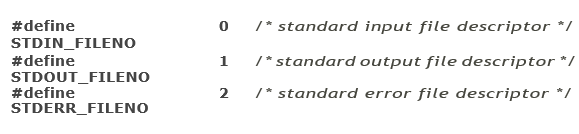
在使用重定向之后,NSLog就不会写到系统的syslog中了。
//
dup2重定向
//
通过重定向,可以直接截取 stdout,stderr 等标准输出的信息,然后保存在想要存储的位置,上传到服务器或者显示到View上。要做到重定向,需要通过 NSPipe 创建一个管道,pipe有读端和写端,然后通过 dup2 将标准输入重定向到pipe的写端。再通
过 NSFileHandle 监听pipe的读端,最后再处理读出的信息。 之后通过 printf 或者 NSLog 写数据,都会写到pipe的写端,同时
pipe会将这些数据直接传送到读端,最后通过NSFileHandle的监控函数取出这些数据。 核心代码如下:
1- ( void)redirectStandardOutput{
2//记录标准输出及错误流原始文件描述符
3self.outFd = dup(STDOUT_FILENO); self.errFd = dup(STDERR_FILENO);
4#if BETA_BUILD
5stdout->_flags = 10;
6NSPipe*outPipe = [ NSPipepipe];
7NSFileHandle*pipeOutHandle = [outPipe fileHandleForReading]; dup2([[outPipe fileHandleForWriting] fileDeor], STDOUT_FILENO); [pipeOutHandle readInBackgroundAndNotify];
8
9stderr->_flags = 10;
10NSPipe*errPipe = [ NSPipepipe];
11NSFileHandle*pipeErrHandle = [errPipe fileHandleForReading]; dup2([[errPipe fileHandleForWriting] fileDeor], STDERR_FILENO); [pipeErrHandle readInBackgroundAndNotify];
12[[ NSNotificationCenterdefaultCenter] addObserver: self
13
14selector: @selector(redirectOutNotificationHandle:) name: NSFileHandleReadCompletionNotificationobject:pipeOutHandle];
15
16[[ NSNotificationCenterdefaultCenter] addObserver: self
17selector: @selector(redirectErrNotificationHandle:) name: NSFileHandleReadCompletionNotificationobject:pipeErrHandle];
18#endif
19}
20
21-( void)recoverStandardOutput{
22#if BETA_BUILD
23dup2( self.outFd, STDOUT_FILENO); dup2( self.errFd, STDERR_FILENO);
24[[ NSNotificationCenterdefaultCenter] removeObserver: self];
25#endif
26}
27
28// 重定向之后的NSLog输出
29- ( void)redirectOutNotificationHandle:( NSNotification*)nf{ #if BETA_BUILD
30NSData*data = [[nf userInfo] objectForKey: NSFileHandleNotificationDataItem]; NSString*str = [[ NSStringalloc] initWithData:data encoding: NSUTF8StringEncoding];
31// YOUR CODE HERE... 保存日志并上传或展示
32#endif
33[[nf object] readInBackgroundAndNotify];
34}
35
36// 重定向之后的错误输出
37- ( void)redirectErrNotificationHandle:( NSNotification*)nf{ #if BETA_BUILD
38NSData*data = [[nf userInfo] objectForKey: NSFileHandleNotificationDataItem]; NSString*str = [[ NSStringalloc] initWithData:data encoding: NSUTF8StringEncoding];
39// YOUR CODE HERE... 保存日志并上传或展示
40#endif
41[[nf object] readInBackgroundAndNotify];
42}
dup函数可以为我们复制一个文件描述符,传给该函数一个既有的描述符,它就会返回一个新的描述符,这个新的描述符是传给它的描述符的拷贝。这意味着,这两个描述符共享同一个数据结构。
而dup2函数跟dup函数相似,但dup2函数允许调用者规定一个有效描述符和目标描述符的id。dup2函数成功返回时,目标描述符(dup2函数的第二个参数)将变成源描述符(dup2函数的第一个参数)的复制品,换句话说,两个文件描述符现在都指向同一个文件,并且是函数第一个参数指向的文件。
//
文件重定向
//
另一种重定向的方式是利用c语言的 freopen 函数进行重定向,将写往 stderr 的内容重定向到我们制定的文件中去,一旦执行了上述代码那么在这个之后的NSLog将不会在控制台显示了,会直接输出在指定的文件中。 在模拟器中,我们可以使用终端
的 tail 命令(tail -f xxx.log)对这个文件进行实时查看,就如同我们在Xcode的输出窗口中看到的那样,你还可以结合 grep 命令进行实时过滤查看,非常方便在大量的日志信息中迅速定位到我们要的日志信息。
FILE * freopen ( const char * filename, const char * mode, FILE * stream );
核心代码如下:
1NSArray*paths = NSSearchPathForDirectoriesInDomains( NSDocumentDirectory, NSUserDomainMask, YES); NSString*documentsPath = [paths objectAtIndex: 0];
2NSString*loggingPath = [documentsPath stringByAppendingPathComponent: @"/xxx.log"];
3//redirect NSLog
4freopen([loggingPath cStringUsingEncoding: NSASCIIStringEncoding], "a+", stderr);
这样我们就可以把可获取的日志文件发送给服务端或者通过itunes共享出来。但是由于iOS严格的沙盒机制,我们无法知道stderr原来的文件路径,也无法直接使用沙盒外的文件,所以freopen无法重定向回去,只能使用第1点所述的dup和dup2来实现。
1// 重定向
2intorigin1 = dup(STDERR_FILENO);
3FILE * myFile = freopen([loggingPath cStringUsingEncoding:NSASCIIStringEncoding], "a+", stderr);
4
5// 恢复重定向
6dup2(origin1, STDERR_FILENO);
//
使用GCD的dispatch Source重定向方式
//
具体代码如下:
1- (dispatch_source_t)_startCapturingWritingToFD:( int)fd {
2intfildes[ 2];
3pipe(fildes); //[ 0] is readend of pipewhile[ 1] is writeend dup2(fildes[ 1], fd); //Duplicate writeend of pipe"onto"fd (this closes fd) close(fildes[ 1]); //Close original writeend of pipe
4fd = fildes[ 0]; //We can now monitor the readend of the pipe
5char* buffer = malloc( 1024);
6NSMutableData* data = [[NSMutableData alloc] init]; fcntl(fd, F_SETFL, O_NONBLOCK);
7dispatch_source_t source = dispatch_source_create(
8DISPATCH_SOURCE_TYPE_READ, fd, 0, dispatch_get_global_queue(DISPATCH_QUEUE_PRIORITY_HIGH, 0)); dispatch_source_set_cancel_handler(source, ^{
9free(buffer);
10});
11dispatch_source_set_event_handler(source, ^{ @autoreleasepool {
12
13while( 1) {
14ssize_t size = read(fd, buffer, 1024);
15if(size <= 0) {
16break;
17}
18[data appendBytes:buffer length:size];
19if(size < 1024) {
20break;
21}
22}
23
24
25
26
27
28}
29});
30
31NSString *aString = [[NSString alloc] initWithData:data encoding:NSUTF8StringEncoding];
32//printf( "aString = %s",[aString UTF8String]);
33//NSLog(@"aString = %@ ",aString);
34// Do something
35
36dispatch_resume(source);
37return source;
38}
39
//
总结
//
虽然上述的几个重定向的方法都能够获取到Log数据,但是弊端是当使用Log重定向之后,连接Xcode进行调试应用程序时,Xcode 的Console中将不会打印任何Log信息,Log信息已经被重定向到了我们指定的文件中了。
这些方法有一定的局限性,在具体使用的 时候,需要视情况而定。当然还有其他的方式能够即重定向Log数据到指定文件,还能够在Xcode的Console中输出日志(pipe、dup2与GCD的相互协作),这样能够避免调试阶段无法实时查看日志的缺陷,进一步的提高开发调试和优化的效率。
另外也可以开发一个在桌面或者网页端实时展示Log信息的应用,实时从重定向的位置读取Log信息,达到实时查看信息的目的等。
声明: 本文由入驻搜狐公众平台的作者撰写,除搜狐官方账号外,观点仅代表作者本人,不代表搜狐立场。
回首页看更多汽车资讯
大白兔
0大白兔 小子
0